 Onwe Damian Chukwuemeka
Do your images actually help your rankings, or are they quietly slowing down your site? While many bloggers treat photos as decorative elements, search engines view them as critical data points that define your page’s relevance and performance.
In 2026, Google relies on your visuals to verify content quality and track site speed. Optimizing these files correctly turns a potential bottleneck into a powerful asset for your search visibility.
Understanding how to manage your visual assets will help you maintain high rankings and keep your site visitors engaged. These steps represent the most effective way to improve your blog’s technical foundation and increase website clicks from Pinterest and other search platforms.
Choose Images That Provide Real Value
Every image you place on your site carries a specific responsibility. Your visuals should either explain a complex concept, demonstrate a physical product, or guide the reader through your content. If an image acts only as a generic placeholder, it is likely cluttering your page rather than adding value. Search engines prioritize content that offers clear utility, so focus on quality over sheer quantity. When you select images that genuinely inform your audience, you signal to search algorithms that your page is a destination for authoritative information.
Create Original Visuals to Stand Out
Generic stock photos often blend into the background because readers have seen them thousands of times across the web. Original visuals, such as custom charts, diagrams, and specific screenshots, do the heavy lifting by proving your unique expertise. When you create your own diagrams, you provide a perspective that competitors cannot replicate. This uniqueness helps establish your brand authority and keeps readers on your page for longer periods.

Custom visuals also serve as powerful trust signals. Readers naturally connect with content that feels grounded in real-world experience rather than polished, artificial stock galleries. Beyond just building trust, unique assets often perform better in image search results, as these files contain metadata and visual patterns that are truly one-of-a-kind. You can learn more about why original photography is better for user experience by reviewing recent studies on audience engagement. If you need to plan when to share your own custom assets to maximize impact, understanding the best times to post on Pinterest for visual marketing can help you distribute your work effectively.
Align Images With Your Surrounding Text
An image only provides value when it exists within a meaningful context. You should place every visual directly next to the paragraph it supports, allowing the reader to reference the image while consuming your text. This proximity helps search engines associate your keywords with the specific visual data, creating a tighter link between your written content and your media. When you fragment this connection, you risk confusing the reader and weakening your SEO signal.
- Proximity: Keep your images within the same screen view as the text they illustrate.
- Relevance: Ensure the image content matches the surrounding sentences exactly.
- Flow: Use images to break up long text blocks, but never place them where they interrupt a thought.
Search engines look for thematic consistency between your image file names, your alt text, and the paragraph text that wraps around the image. If you describe a process in a paragraph and immediately show a screenshot of that process, you provide a clear, logical path for both the human reader and the search crawler. This alignment ensures that your visuals work as an extension of your writing rather than an afterthought.
Technical Best Practices for Your Image Files
Your images are significant assets, but they often act as hidden performance killers if you ignore the technical foundation. Every file you upload to your server carries metadata and code instructions that search engines process alongside your text. By refining how you name, format, and compress these assets, you improve both your site speed and your visibility in search results.

Rename Files Before Uploading
Many cameras and mobile devices assign generic labels like “IMG_5832.jpg” to your photos. These names tell search engines nothing about the content of your visual. When you upload a file with an arbitrary name, you lose a prime opportunity to reinforce your page’s topical relevance.
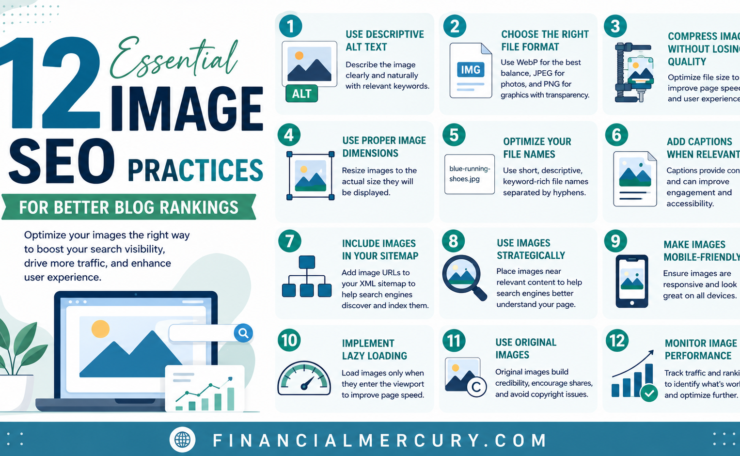
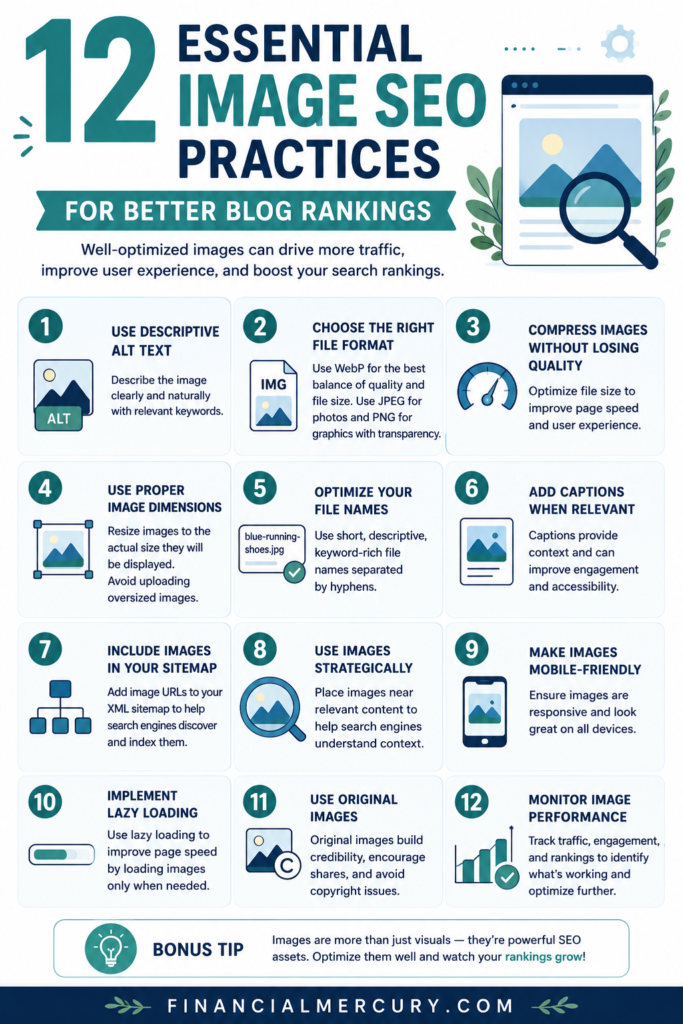
Always rename your files using descriptive, human-readable keywords before you upload them. Use hyphens to separate words because search crawlers recognize hyphens as spaces. Keep your naming convention simple, consistent, and lowercase. For example, replace “IMG_5832.jpg” with “how-to-optimize-images.jpg” if the photo demonstrates that specific process.
This habit is a core part of technical image optimization for Pinterest, as it helps search algorithms categorize your content more accurately. Think of your file name as a brief, permanent label that summarizes the visual for the search engine’s index. Consistent naming helps you stay organized while providing valuable context that boosts your overall SEO profile.
Optimize for Faster Loading Speeds
Large, uncompressed image files are often the primary cause of slow page performance. Heavy files force a user’s browser to work overtime, which delays the initial render and negatively affects your Core Web Vitals. You must prioritize file size reduction to maintain high engagement and positive search rankings.
Modern formats such as WebP and AVIF provide better compression than older standards like JPEG or PNG without sacrificing visual clarity. AVIF is the current leader for file size efficiency, making it a top choice for high-quality photos. However, WebP is a reliable, widely supported default that works across almost all modern browsers. You should reserve SVG format for logos, icons, and simple vector graphics because they scale perfectly without losing quality.
Compression is just as important as the file format itself. Use tools to strip unnecessary metadata from your files, as this can shave off several kilobytes from every image. If you want to learn more about balancing quality and performance, Google’s guidance on image SEO offers specific technical recommendations for developers. Always test your site speed after adding images to ensure your media remains a benefit rather than a burden.
Mastering Alt Text for Accessibility and SEO
Alt text serves as the bridge between visual content and universal understanding. When you provide descriptive text for your images, you enable screen reader users to perceive your content while also giving search engines the context they need to index your visuals correctly. Mastering this practice improves your site’s inclusivity and contributes to better overall search visibility.

Write Clear and Natural Descriptions
Effective alt text is accurate, concise, and context-aware. Your goal is to convey the purpose of the image, not just list every item within the frame. Avoid starting your description with phrases like “image of” or “picture of,” as screen readers already identify the element as a visual. Focus on the core story the image tells to ensure the information is helpful for everyone.
You should avoid keyword stuffing, which often results in awkward, robotic sentences that frustrate readers and signal poor quality to search engines. If you can naturally include a target keyword, do so, but never prioritize search terms over clear communication. Google provides technical guidance on balancing these needs for better accessibility.
Consider these comparisons to understand the difference between helpful and ineffective descriptions:
| Image Type | Weak Alt Text | Strong Alt Text |
|---|---|---|
| Laptop setup | Photo of a laptop | Person typing on a laptop at a bright desk |
| Data chart | Chart showing growth | Bar chart showing 20% growth in annual site traffic |
| Navigation button | Button | Search the financial archives |
Specificity makes a massive difference. If your image shows a complex process, focus your alt text on the result or the main takeaway. If the image is purely a decorative detail, keep your description focused on the immediate context of the surrounding paragraph. For further strategies on writing effective descriptions, review HubSpot’s guide on image alt text.
When to Leave Alt Text Empty
Not every image requires a description. If an image is purely decorative, such as a divider, a background pattern, or an abstract icon that provides no new information, you should use a null alt attribute. Leaving the alt attribute empty, often represented as alt="" in code, tells screen readers to ignore the image entirely.
This practice prevents accessibility tools from cluttering the user experience with unnecessary labels. If a blind user hears “image” or a generic file name for every single decorative line or icon, it creates “noise” that distracts from the actual content. By identifying which images add value and which ones are just for visual polish, you ensure that your site remains clean and easy to navigate for all visitors.
When in doubt, ask yourself if the page would lose meaning if the image were removed. If the answer is no, a null alt attribute is the standard choice. This approach aligns with the authoring standards for meaningful alternative text set by accessibility authorities. Using empty tags keeps your code tidy and focuses attention on the assets that actually inform your reader.
Smart Placement and Formatting Strategies
How you organize and deliver images on your page dictates whether your site feels snappy or sluggish. Placing high-resolution files without proper guidance forces browsers to process more data than the screen actually requires. By using modern browser features to manage display sizes, you ensure that visitors only download what they need.

Use Responsive Sizing for Mobile Users
Many sites mistakenly rely on CSS to shrink large images to fit smaller screens. This approach is inefficient because the browser still downloads the original, high-resolution file. The user consumes unnecessary bandwidth, and the page takes longer to become interactive.
You should use the srcset attribute instead. This HTML feature allows you to provide multiple versions of the same image. The browser then detects the device width and automatically selects the most appropriate file size.
- Save bandwidth: Users on mobile devices download smaller files optimized for their specific screens.
- Maintain quality: High-resolution displays receive the crisp, dense image versions they require.
- Boost speed: Smaller files reduce the total weight of your page, which improves performance metrics.
For developers seeking technical details, Google provides documentation on image SEO best practices to help implement these attributes correctly. Relying on the browser to choose the right image is a more effective strategy than forcing a single, heavy file to adapt. Learn more about using responsive images in HTML to build a faster, more flexible layout.
Implement Lazy Loading for Better Performance
Lazy loading is a technique that delays the loading of off-screen images until a reader scrolls near them. It is a simple but highly effective way to keep your initial page load times low. If your page contains many images, loading them all at once consumes significant resources and delays the display of critical text.
When you implement lazy loading, the browser only fetches the assets that are immediately visible to the user. This keeps the initial render time fast and improves your site’s perceived speed. You can find more detail on how responsive web design supports content changes alongside these performance tactics.
However, you should avoid lazy loading for the “hero” image or any primary visual at the top of your page. These elements must appear as soon as the page loads to give visitors an immediate anchor. You can use the loading="lazy" attribute on your image tags to enable this behavior for everything else below the fold. This approach helps you maintain better Core Web Vitals, as the browser focuses its limited power on the most important parts of your content first.
A Quick Checklist for Your Image Workflow
Building a consistent routine is the best way to keep your site fast and your search rankings high. When you turn these steps into a standard habit, you save time while ensuring every visual asset performs at its peak. Use this checklist every time you prepare an image for your blog to keep your production process efficient and effective.

Pre-Upload Preparation
Before you even touch your media library, you need to prepare the file for search crawlers. Start by evaluating if the visual actually enhances your content or if it just occupies space.
- Rename the file: Change generic names like “IMG_001.jpg” to descriptive, hyphen-separated text that reflects the content.
- Size and compress: Resize the image to fit your container width and compress it to keep the file size under 250KB.
- Select the format: Choose WebP or AVIF for the best balance of quality and speed.
- Confirm originality: Verify the image is custom or licensed, as unique visuals help you stand out in search results.
Following these steps is a great way to maintain technical hygiene. You can review the complete image optimization checklist for 2026 if you want to look at more advanced technical benchmarks.
Post-Upload Optimization
Once the file is on your server, you need to provide the context required for Google to index it correctly. These final touches ensure your work contributes to your overall SEO strategy.
- Write accurate alt text: Describe the image clearly without keyword stuffing.
- Set the title attribute: Use a concise label if your platform requires it, though the file name and alt text are more important for SEO.
- Add a relevant caption: Include a sentence that connects the image to the nearby paragraph.
- Enable lazy loading: Ensure your platform uses standard loading attributes to keep the initial page view fast.
Check that every image sits in close proximity to the text it illustrates. This placement keeps the reader engaged and reinforces the connection between your written content and your visual assets. If you want to see how these steps fit into a broader SEO strategy, this guide on optimizing images for search offers excellent context on how crawlers interpret these elements. Consistent execution of these steps builds a solid foundation for your site performance.
Conclusion
Effective image optimization combines technical performance with clear, descriptive context. When you prioritize fast loading times and accurate alt text, your site becomes more accessible and easier for search engines to index. These small adjustments improve your overall visibility while creating a better browsing experience for your audience.
Consistency is the key to maintaining these standards over time. Treat your media assets as a fundamental part of your content strategy, and you will see steady improvements in your search performance.
Save the pin for later

- How I Make Money on Pinterest Pinning in 2026 - June 23, 2026
- How to Research Pinterest Keywords for Blog Posts In 2026 - June 23, 2026
- How to Set Up Google Search Console for a Blog - June 23, 2026