 Onwe Damian Chukwuemeka
An audit is more than a simple cleanup project. While many view it as a way to delete broken links or outdated posts, it is actually a strategic way to boost traffic and refine your reader experience.
In 2026, the old approach of publishing as much as possible doesn’t work. Quality is the primary driver of success today. When you evaluate your existing posts, you gain a clear view of what resonates with your audience and what needs to change.
By sharpening your focus, you ensure your site stays relevant to search engines and AI discovery tools. This process helps you stop wasting time on low-impact work while you build a stronger foundation for earning income online. Let’s walk through the steps to effectively review your blog content.
Defining Your Goals for the Content Audit
An audit is a massive undertaking, and it often feels overwhelming if you lack a clear destination. Before you open a single spreadsheet or log into your analytics dashboard, you must decide what success looks like for your specific site. Setting one primary objective prevents the process from becoming a disorganized slog through hundreds of old posts.

Identify Your Primary Motivation
Every successful audit starts with a single question: What do you want to change today? Trying to fix everything at once usually results in burnout. When you pin down a clear priority, the rest of the work follows a logical path.
Common goals that drive effective audits include:
- Increasing organic search traffic: You focus on updating underperforming posts that have the potential to rank better if they provide more current value.
- Improving conversion rates: You examine which pages successfully turn readers into subscribers or customers, then apply those same traits to your weaker content.
- Boosting AI search visibility: You structure your information to be clearer and more concise, which makes it easier for AI tools to source and cite your expertise.
- Removing or merging content: You clean up thin or duplicate pages that clutter your site and confuse search engines.
Aligning Goals With Business Outcomes
Think about your blog as a business asset rather than just a collection of thoughts. If you want to drive website traffic with Pinterest later, your audit might prioritize visual-heavy posts that already perform well. Identifying content gaps is another smart goal; it helps you find the missing pieces in your library that your audience currently searches for elsewhere.
Focusing on one goal allows you to ignore the noise. If your goal is to boost search traffic, you won’t waste time obsessing over page design or minor copy edits on posts that don’t bring in visitors. You prioritize the work that delivers the most significant return on your time. Choose a direction, stick to it, and use that focus to guide every decision you make during the review.
Gathering Your Data into One Master List
Now that you have clear goals, it is time to build your master audit sheet. Think of this document as the command center for your entire project. If you have ever felt overwhelmed by managing spreadsheets, remember that it is just a container for your site information. Having everything in one place makes it easy to spot patterns and decide which posts need attention.

Collecting Your Website URLs
You cannot fix what you cannot see, so the first step is generating a comprehensive list of every published URL. If your site runs on WordPress, you can use specialized tools like the Export All URLs plugin to pull a clean list of posts and pages instantly. For those who prefer a more technical approach or use other platforms, Screaming Frog SEO Spider provides a thorough crawl of your entire site structure.
You might also find your site map helpful for this task. By grabbing the list of URLs from your XML sitemap, you ensure you catch everything Google currently indexes. Exporting WordPress post URLs is straightforward once you know which tool fits your technical comfort level. Once you have your baseline list, move it into a spreadsheet to begin the heavy lifting.
Adding Essential Metrics to Your Spreadsheet
Raw URLs are just a start. To make real decisions, you need to append data to each row that tells you how the content is performing. You should pull traffic and keyword data from Google Search Console and analytics tools to create a complete picture.
A robust audit sheet usually includes these specific columns:
| Column Header | Purpose |
|---|---|
| URL | The unique link for each post or page. |
| Page Title | The main headline used for tracking and identification. |
| Monthly Traffic | The number of visitors the page receives from search. |
| Target Keywords | The primary search terms the content is meant to rank for. |
| Last Updated | The date you last revised the content for accuracy. |
| Action Status | A tag such as Keep, Update, Merge, or Delete. |
These metrics act like a diagnostic report for your site. By comparing your traffic numbers against the last updated date, you quickly see which posts have become stale. Much like financial record keeping and audit preparation, the quality of your data dictates the quality of your insights.
Merging External Data Sources
Your site crawler or export tool will give you the structure, but external sources fill in the blanks. Log into Google Search Console to export your performance report for the past 12 to 16 months. You can then use a simple VLOOKUP or copy-paste method to align this traffic data with the URLs in your master list.
This consolidation process is where the real strategy happens. You might discover that a post has high potential keywords but zero traffic, signaling a need for a rewrite. Alternatively, you may find old pages that still bring in steady traffic and deserve a quick refresh. By keeping your data centralized, you move from guessing to making informed edits that directly impact your growth.
Sorting and Labeling Your Blog Posts
Once your data is gathered, you have to turn that spreadsheet into a clear action plan. Every URL needs a specific label that tells you exactly how to handle it. Think of this as the triage phase of your audit. You are categorizing content to decide what stays, what changes, and what goes away. This organized approach brings clarity to your workflow and prevents you from feeling lost in a sea of old posts.

Use these four labels to manage your library effectively:
- Keep: Posts that are currently performing well, ranking for target keywords, and providing real value. You don’t need to change these, though a quick scan for broken links is always a good idea.
- Update: Content that is still relevant but feels slightly tired or outdated. This includes posts with old statistics, broken examples, or thin formatting that could be improved with better structure.
- Combine: Articles that cover the same ground. If you have several posts competing for the same search intent, merge them into one authoritative resource.
- Delete or Redirect: Pages that serve no purpose, have zero traffic, or contain information that is no longer accurate. Always set up a 301 redirect if the deleted page has backlinks to avoid losing that authority.
Identifying Posts That Need a Refresh
Focus your attention on content that shows potential but is currently underperforming. These are the “sleeping giants” of your site. They likely rank on page two of search results or get a trickle of traffic that could be much higher with the right adjustments. When you spot a post with a solid topic but outdated information, prioritize it for an immediate refresh.
Look for posts that suffer from poor formatting or a lack of depth. If a reader lands on a page only to find walls of text without headings or images, they will likely leave quickly. Search engines notice this high bounce rate and push your rankings down as a result. By breaking up long paragraphs, adding current data, and improving your internal linking structure, you turn these weak spots into high-value assets. Refreshing content is often faster than writing something new from scratch, and it provides a quicker path to better search performance. You can apply many of the same effective money management activities to your content strategy, such as pruning unused “assets” to keep your focus on what actually grows your audience.
Managing Overlapping Content
If you have multiple posts covering the same keyword or topic, you are likely hurting your own search rankings. This is known as keyword cannibalization. When two or more of your pages fight for the same search query, Google struggles to decide which one is the most authoritative. As a result, none of your pages climb to the top of the search results.
The best strategy is to merge these overlapping posts into one definitive guide. By taking the best sections from each thin post, you build a single, comprehensive piece that covers the topic thoroughly. According to guidance on conducting a content audit, consolidating content removes the confusion for search engines and signals that you have the most complete answer to the reader’s question. After you combine the information, use a 301 redirect on the old, redundant URLs. This sends all that accumulated authority to your new master post, helping it rank faster. If you want to see how to approach these types of structural decisions, check out how to perform a content audit for a more detailed look at the mechanics of redirects and consolidation. Maintaining a clean site structure prevents clutter and makes it easier for your audience to find the exact information they need.
Executing Your Updates and Optimizations
Once you have your audit spreadsheet ready, the actual work begins. You shift from planning mode into the role of an editor, systematically improving each piece of content. This phase is about increasing the value of your existing library rather than just fixing errors. You want to make every post more useful for your readers and more relevant to current search trends.

Modernizing Your Core Content
Start by reviewing the information within each post. If you are updating a guide about tools or methods, check if the steps still work as described. Replace outdated statistics with fresh data from the last twelve months. If a post references software or services, ensure those companies are still active and relevant.
You should also look at the structure of your writing. Modern readers prefer scannability. If you find long, dense blocks of text, break them into smaller paragraphs. Use clear headings to guide the reader through your main points. For a deeper look at how to refine your approach, check out these best practices for updating old blog content.
Refining Titles and Search Intent
Sometimes a post doesn’t rank because the headline fails to capture what the reader actually wants. Re-examine your target keywords against the current search results. If the top-ranking pages focus on a slightly different angle than your post, adjust your title and content to match that expectation. Google’s guidance on search intent suggests that alignment is the primary factor for long-term visibility.
Beyond the title, make sure your introduction answers the reader’s question within the first two or three sentences. Most visitors decide within seconds if a page has the information they need. By being direct and clear from the start, you keep readers on your site and signal to search engines that your content is high quality.
Strengthening Internal Connections
Internal linking is often an afterthought, but it is one of the most effective ways to pass authority between your posts. During your update, look for opportunities to link to your newer, more comprehensive articles. This creates a helpful path for your readers and keeps them engaged with your site longer.
You should also audit your existing links to ensure they still function. A broken link creates a poor experience and suggests your content is neglected. When you replace or add links, use descriptive anchor text that tells the reader exactly what to expect. If you want to refine how you manage these relationships across your site, look into optimizing Pinterest posting schedules or similar topics to see how linking between related content keeps your audience active.
Finalizing Your Improvements
As you finish each update, check for any lingering issues that might hurt your performance. Ensure your images have descriptive alt text and that your file sizes are optimized for quick loading. You might also consider adding an FAQ section at the end of your post to capture specific questions your readers might ask. Adding this type of content can make your work more likely to appear in snippets and AI-generated answers.
Keep your record of changes in your master audit sheet. Marking a post as updated with a date helps you keep track of when that content needs another look in the future. By maintaining a consistent schedule of ways to refresh your blog posts, you turn your site into a living resource that stays relevant year after year.
Measuring Your Success After the Audit
Running an audit is not a one-time event where you simply tick a box and walk away. The true value appears in the weeks and months that follow your updates. You must monitor your performance to see if your changes actually hit the mark or if they need further refinement. This final phase is how you turn a massive cleanup effort into a long-term strategy for growth.

Tracking Key Performance Indicators
You need to know if your hard work leads to better results. Start by checking your organic traffic for the pages you updated. Compare these numbers against your baseline data from before the audit to spot any upward trends. According to common website content audit advice, you should check your progress against the goals you set at the start to verify if your strategy is working.
Focus on these core metrics to judge your success:
- Keyword rankings: Watch if your target phrases move up in search results. A steady rise in position is a clear sign that search engines prefer your updated content.
- Click-through rate: If you tweaked your titles and meta descriptions, look for an increase in how many people click your link when they see it in search.
- Engagement rate: Monitor whether readers stay on your page longer or interact with your content. A higher engagement rate usually means your updates improved the overall user experience.
- Conversion growth: If your goal is to grow your business, track how many signups or clicks occur on your updated pages. According to industry standards for performance, you can often expect noticeable improvements in your conversion rates within 90 days.
Planning for Long-Term Maintenance
Content performance does not change overnight. Search engines take time to crawl your site and recognize the improvements you made. Be patient as you monitor these shifts. If you do not see immediate movement, give the changes another month or two before you decide to edit the content again.
Consistency is the real key here. Establish a routine for checking your data every month rather than every day. You can measure your content success effectively by keeping a separate tab in your master spreadsheet for post-audit analysis. Document the dates you updated each post so you can cross-reference those dates with your traffic spikes later. This habit creates a feedback loop that helps you write better content from the very start.
Conclusion
Running an audit is not a one-time chore to check off your list. It is an ongoing practice that keeps your blog healthy, accurate, and relevant for your audience.
Just like physical maintenance, your content requires regular checkups to stay effective. Search engine trends shift and information ages quickly, so reviewing your work keeps your site competitive over time.
Build a habit of checking your performance data every few months. This approach ensures your library continues to serve your readers and supports your growth goals.
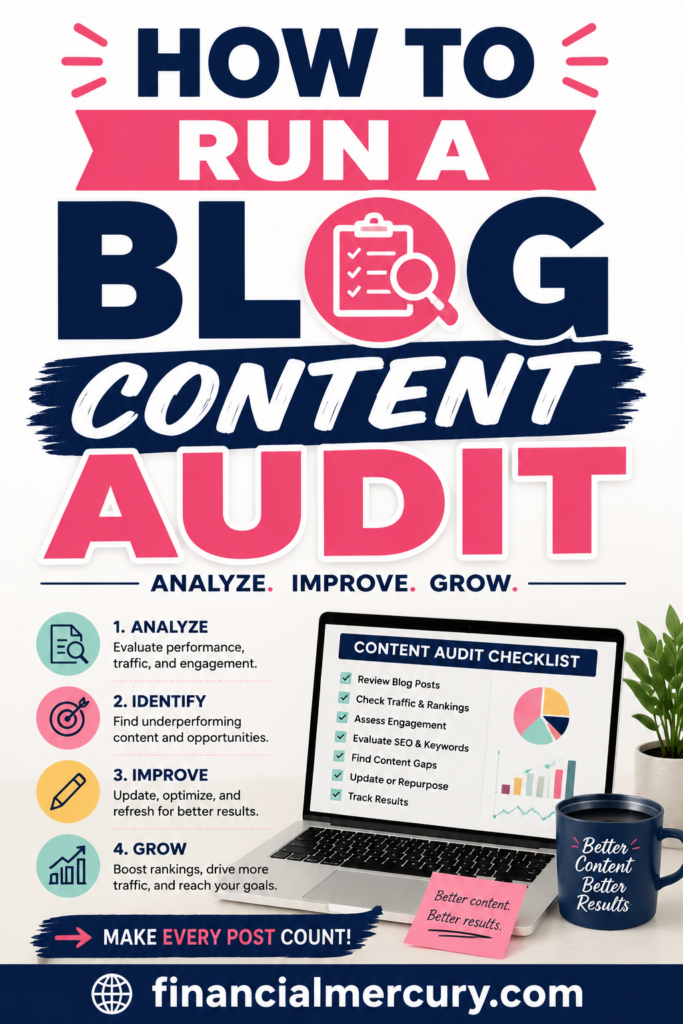
Save the pin for later

- How I Make Money on Pinterest Pinning in 2026 - June 23, 2026
- How to Research Pinterest Keywords for Blog Posts In 2026 - June 23, 2026
- How to Set Up Google Search Console for a Blog - June 23, 2026